
Context of a pipeline
This document describes the context information set by the pipeline during its execution.
The context is an object (wizata_dsapi.Context) initialized when a pipeline execution starts and terminated when it stops. It acts as the shared data carrier across all pipeline steps, providing each step with access to dataframes, properties, models, plots, datapoint metadata, and other execution information.
For the full list of attributes and methods, refer to the SDK Context reference.
Properties
Properties is a dictionary initialized when a pipeline starts. It persists across the entire execution and is accessible by every step. It is useful for passing information between steps that cannot be stored inside a time-series dataframe.
Properties are populated from three sources:
- Execution parameters: values passed directly when calling the pipeline from code or filled in manually by the user in the UI when prompted by pre-defined variables.
- Template properties: all property values from the twin registration used at execution time are automatically included.
- Script steps: a previous step can append custom values to the properties dictionary using
context.append().
It is best practice not to use template property names for your custom properties to avoid naming conflicts.
def your_function(context: wizata_dsapi.Context):
    my_value = context.properties["my_key"]
Properties can also be used to dynamically configure a step, for example to pass a dataframe column mapping for a Write step, or any other runtime parameter.
Dataframe
The primary input dataframe for a step is accessible via context.dataframe. This is a single pandas.DataFrame instance passed as input to the current step.
def your_function(context: wizata_dsapi.Context):
    df = context.dataframe
    # YOUR LOGIC
    context.result_dataframe = df
All named dataframes generated by previously executed steps are also accessible via context.dataframes, which is a dictionary keyed by their names. This allows a step to access the output of any earlier step in the pipeline, not just its direct input.
Datapoints
All Query steps executed before the current step will populate the datapoints attribute of the context. This is a dictionary where each key is either the hardware ID or the template property name used in the query, and each value is the full wizata_dsapi.Datapoint object.
This allows you to access datapoint metadata such as unit, business type, min, max, and any custom properties, to parameterize your script logic at runtime.
def your_function(context: wizata_dsapi.Context):
    dp = context.datapoints["Bearing1"]
    unit = dp.unit
    max_value = dp.max
Models and Plots
Models and plots generated by previously executed steps are also accessible through the context, read-only, via context.models and context.plots. These are dictionaries keyed by their names within the pipeline.
To set a model from within a training script, use context.set_model(). To set a plot from within a plot script, use context.set_plot().
# Setting a model
context.set_model(trained_model, features=x.columns)

# Setting a plot
context.set_plot(fig, "My Plot Title")
Other Useful Attributes
The context also exposes several other attributes that can be useful when writing pipeline scripts:
context.now: the reference datetime used asnowfor the current execution.context.execution_id: the ID of the current execution.context.experiment_id: the ID of the current experiment, if running in experiment mode.context.pipeline_id: the ID of the pipeline being executed.context.template: the Template associated with the pipeline, if any.context.registration: the Twin registration associated with the current execution.context.config: a dictionary containing all custom configuration key/values defined in the platform'scustom.inifile. Useful for storing and accessing sensitive information such as API credentials or integration settings. For more details, refer to Custom configuration.
Logging
You can write log messages from within any script using context.write_log().
context.write_log("[LOG] uptime done, applying filters", level=20)  # INFO
context.write_log("Something went wrong", level=40)  # ERROR
These logs will be visible in the Execution Logs page:
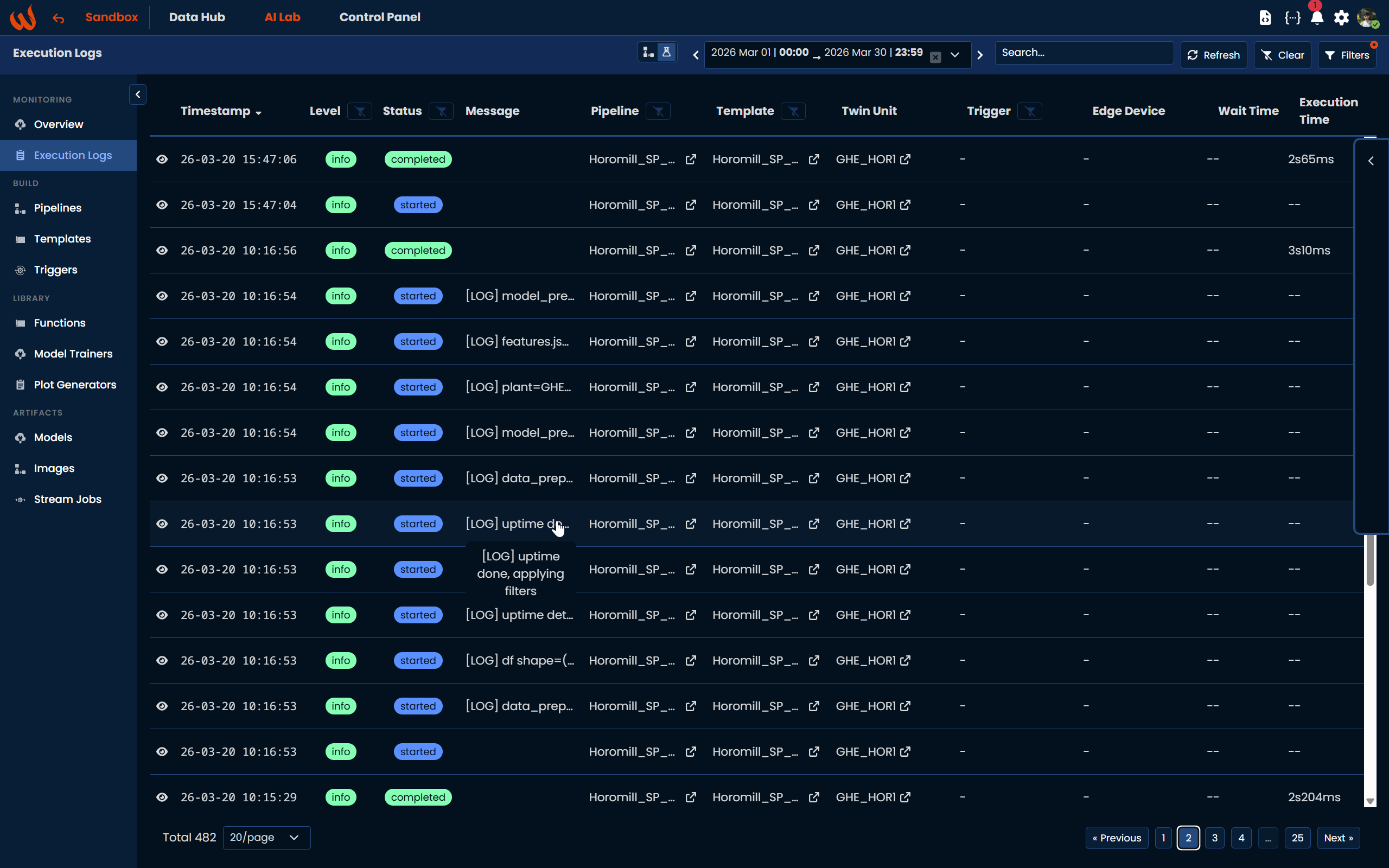
Logging levels follow Python's standard: 10=DEBUG, 20=INFO, 30=WARNING, 40=ERROR, 50=CRITICAL.
Updated 6 months ago