
Alert step
An Alert step allows you to define notification behavior directly within a pipeline. When the pipeline reaches an Alert block during execution, it evaluates a condition against the input dataframe and, if met, dispatches a notification to the configured recipients through one or more channels such as push notifications, email, SMS, or WhatsApp.
Alert steps integrate with Wizata's incident tracking system, which groups repeated anomalies into episodes rather than sending a new notification on every execution. This prevents notification spam while still ensuring the right people are informed when a real issue is detected.
An Alert step must have exactly one input and no outputs. It always acts as a terminal block in the pipeline.
Recipient Lists
Before configuring an Alert block, you can optionally create a Recipient List to define who should be notified. Navigate to AI Lab > Library > Recipient Lists and click + Add. Set a unique key, a display name, and add the recipients you want to include.
Each recipient entry can target:
- A platform user: select from the registered users in your environment.
- An email address: free text, does not need to be a registered platform user.
- A phone number: for SMS or WhatsApp notifications.
A recipient list can mix all of these entry types freely.
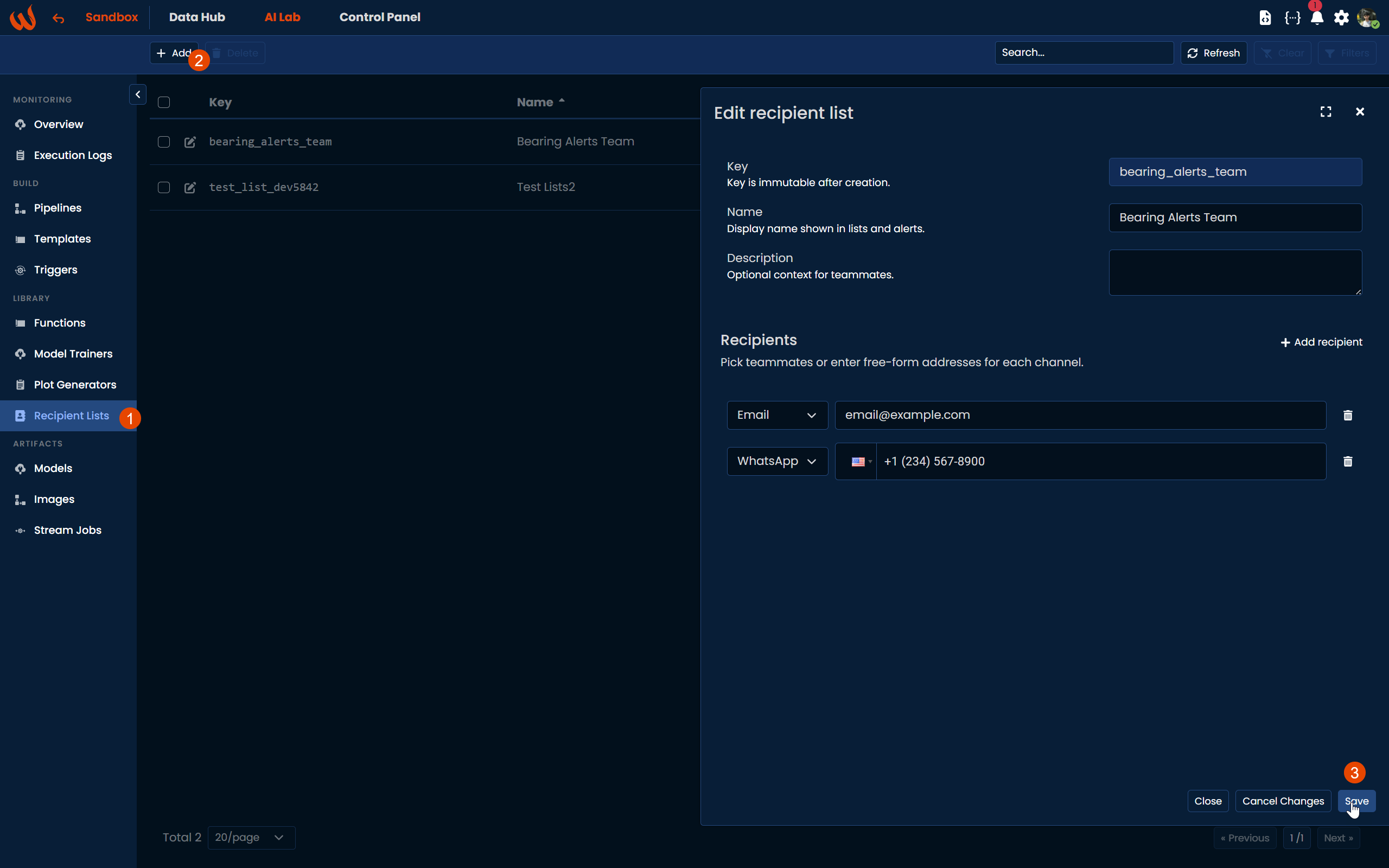
Once created, the list can be referenced from the Alert block by its key.
Adding an Alert Step
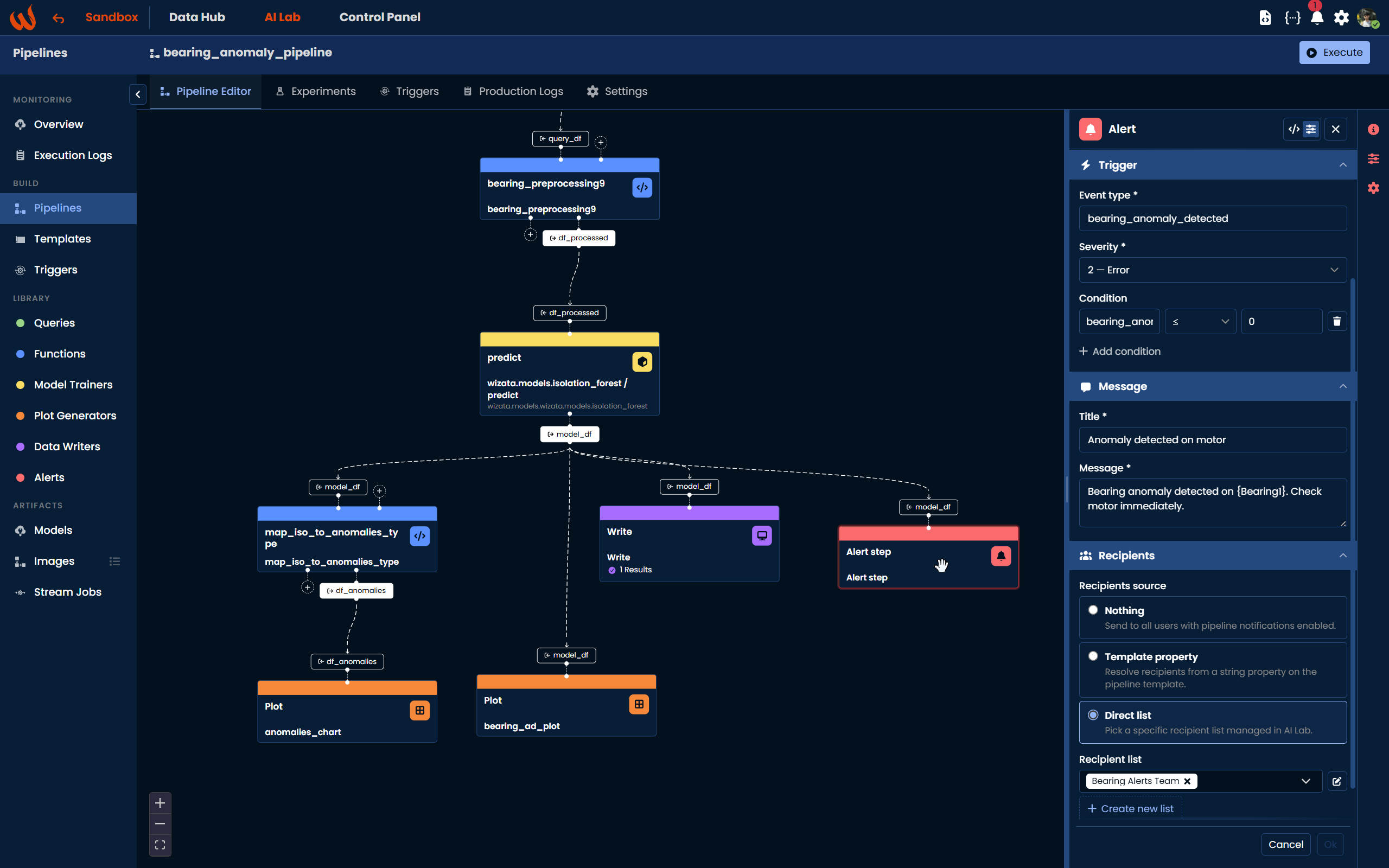
Using the Pipeline UI, navigate to Library > Alerts in the left-hand panel and drag the block onto the canvas. Connect the input dataframe from the previous step. A configuration panel will open on the right where you can set all the alert parameters.
Using the Python Toolkit, use pipeline.add_alert() with an AlertConfig object:
from wizata_dsapi import AlertConfig, AlertType

alert_cfg = AlertConfig(
    mode="declarative",
    event_type="my_event_code",
    severity=2,
    title="Alert title",
    message="Alert message body",
    condition={"my_column": {"lte": 0}},
    recipient_list_key="my_recipient_list",
    activation_threshold=1,
    expiration_cycles=3,
    channels=[AlertType.PUSH_NOTIFICATION, AlertType.EMAIL]
)

pipeline.add_alert(
    config=alert_cfg,
    df_name="my_input_dataframe"
)
Two Modes
The Alert step works in two modes.
Declarative Mode (no-code)
In declarative mode, the execution engine handles all evaluation automatically. You configure the condition, title, message, severity, and recipients directly on the block, and the engine fires the notification when the condition is met.
This is the recommended mode for most use cases and is the default when creating a block from the Pipeline UI.
Script Mode (code)
In script mode, you reference an existing pipeline script that contains the notification logic. The script calls context.api.send_alerts() to dispatch the notification with full control over when and how it fires.
def my_alert_script(context):
    df = context.dataframe
    if df is None or df.empty:
        return df

    row = df.iloc[0].to_dict()
    if row.get("bearing_anomaly", 1) >= 0:
        return df  # no anomaly this cycle

    context.api.send_alerts(
        message=f"Anomaly detected. Value: {row['bearing_anomaly']}",
        alert_type=wizata_dsapi.AlertType.PUSH_NOTIFICATION,
        subject="Bearing anomaly detected"
    )
return dfalert_cfg = AlertConfig(
mode="script",
event_type="bearing_anomaly_detected",
script_name="my_alert_script",
recipient_list_key="bearing_alerts_team",
activation_threshold=1,
expiration_cycles=3
)
pipeline.add_alert(
config=alert_cfg,
df_name="model_df"
)
context.api.send_alerts()withAlertType.PUSH_NOTIFICATIONcan only be called from within an Alert step. Calling it from a Script, Model, or Plot step will raise aRuntimeError.
Configuration Fields
Trigger
event_type(required): a short string label that identifies this type of alert. It is used for incident tracking and written as a tag in the platform. For example:bearing_anomaly_detected.severity(declarative mode): an integer from 1 to 7 following the Syslog standard. 1 is Critical, 2 is Error, 3 is Warning, 4 is Notice, 5 is Informational, 6 is Debug.condition(declarative mode): a filter dictionary evaluated against the first row of the input dataframe. If empty or not set, the alert always fires. See the Condition Format section below.
Message
title(declarative mode): the notification title. Supports{col}placeholders resolved from the first row of the dataframe.message(declarative mode): the notification body. Also supports{col}placeholders.
Advanced
activation_threshold: the minimum number of consecutive pipeline executions that must trigger the condition before the first notification is sent. Default is1. Setting this to2or3helps avoid notifications from isolated noise.expiration_cycles: the number of consecutive executions where the condition is not met before the current episode is considered closed. Default is3. Once an episode closes, the threshold counter resets and the next trigger starts a new episode.
Recipients
recipient_list_key: determines who receives the notification. There are three modes:- Not set: the notification is sent as a push notification to all platform users who have subscribed to pipeline notifications for this twin.
- Template property name: the value is resolved at runtime from the twin registration, allowing different twins to use different recipient lists from a single pipeline definition.
- Direct list key: the notification is dispatched to the specified recipient list directly.
channels: an optional list ofAlertTypevalues to restrict which channels are used. If not set, all channels configured in the recipient list are used.
Condition Format
The condition is evaluated against the first row of the input dataframe. It follows an AND logic across all clauses.
condition = {
    "column_name": {"operator": value},
    "other_column": {"operator": value}
}
Supported operators: eq, ne, gt, gte, lt, lte.
If a column referenced in the condition is missing or None in the row, the condition fails and no notification is sent.
Examples:
# Fire when bearing_anomaly is -1 (Isolation Forest anomaly output)
condition = {"bearing_anomaly": {"lte": 0}}

# Fire when temperature exceeds threshold AND status is warning
condition = {
    "temperature": {"gt": 80.0},
    "status": {"eq": "warning"}
}

# Always fire (no filter)
condition = {}
Column Placeholders in Title and Message
Both title and message support {col} placeholders that are resolved from the first row of the input dataframe at execution time using Python's str.format().
title   = "Anomaly detected on {twin_name}"
message = "Bearing {sensor_id} reached value {bearing_anomaly} at {timestamp}"
If a placeholder references a column that does not exist or contains None, it is left as-is in the output without raising an error.
Notification Channels
The following channels are available via AlertType:
AlertType.PUSH_NOTIFICATION: mobile push notification via the Wizata app.AlertType.EMAILAlertType.SMSAlertType.WHATSAPPAlertType.SLACK: Slack via webhook.AlertType.TEAMS: Microsoft Teams via webhook.
Incident Lifecycle
The Alert step tracks each alert as an episode keyed by (alert_rule, twin). This means the same pipeline running for Motor 1 and Motor 2 will maintain separate incident histories for each motor.
- On each execution where the condition is met, the occurrence counter increments.
- The first notification fires when
occurrence_count >= activation_threshold. - Within an active episode, only one notification is sent regardless of how many subsequent executions also meet the condition.
- An episode expires when the condition has not been met for
expiration_cyclesconsecutive executions. Once expired, the next occurrence starts a new episode and the threshold counter resets.
JSON Format
{
  "type": "alert",
  "name": "bearing-anomaly-alert",
  "config": {
    "mode": "declarative",
    "eventType": "bearing_anomaly_detected",
    "severity": 2,
    "title": "Anomaly detected on motor",
    "message": "Bearing anomaly detected. Value: {bearing_anomaly}",
    "condition": { "bearing_anomaly": { "lte": 0 } },
    "activationThreshold": 2,
    "expirationCycles": 3,
    "recipientListKey": "bearing_alerts_team",
    "channels": ["push_notification", "email"],
    "scriptName": null,
    "groupSystem": null
  },
  "inputs": [{ "dataframe": "model_df" }],
  "outputs": []
}
For more details on how to build a complete pipeline that includes an Alert step, refer to the Tutorial: Anomaly Detection Solution.
Updated 6 months ago